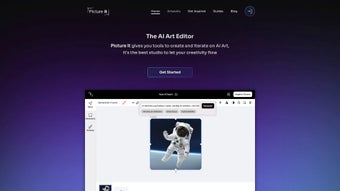

Download Picture it – Free AI Art Editor, Secure & Easy to Use
Overview
Picture it is a cloud‑based AI art editor that turns simple ideas into polished visuals in seconds. Built on the latest Stable Diffusion models, the platform supports text‑to‑image, inpainting, outpainting, and drawing‑guided generation, all from a clean web interface. Whether you are a hobbyist sketching a quick meme, a teacher preparing visual aids, or a professional designer looking for rapid concept drafts, Picture it removes the steep learning curve that traditionally accompanies generative AI.
Users type a prompt, upload a rough sketch, or provide a partial image; the AI then fills gaps, expands borders, or re‑imagines the composition while preserving style and lighting consistency. An integrated prompt‑auto‑suggestion engine helps beginners craft effective queries, and a vibrant community library offers ready‑made prompts, model tweaks, and inspiration from thousands of creators worldwide. While the service runs entirely in a browser—eliminating the need for local installations—it does not currently provide offline access, native mobile apps, layer‑based editing, or an open API.
Nonetheless, for anyone seeking a free, secure, and constantly updated AI art tool that works on any modern device, Picture it delivers a compelling, low‑barrier experience that democratizes high‑quality visual creation.
Features & Usage
- Stable Diffusion Engine: Generates photorealistic and stylized images with high fidelity.
- Inpainting: Remove or replace elements within an existing image with context‑aware fills.
- Outpainting: Expand canvas size while keeping visual coherence for widescreen scenes.
- Sketch‑Guided Generation: Upload a line drawing; the AI interprets poses, perspective, and composition.
- Prompt Auto‑Suggestion: Real‑time keyword recommendations improve output quality.
- Community Prompt Library: Browse, remix, and save popular prompts created by other users.
- Real‑time Preview: Watch the image evolve before finalizing, allowing quick adjustments.
Getting started is straightforward: after creating a free account, you land on a dashboard where three generation modes are presented—Text Prompt, Sketch Upload, and Image‑to‑Image. Select a mode, enter your description or upload your sketch, then fine‑tune parameters such as style, resolution, guidance scale, and random seed using intuitive sliders. The “Generate” button sends your request to powerful cloud GPUs; within seconds a live preview appears, showing the AI progressively painting the canvas.
If the result isn’t perfect, you can modify the prompt, adjust the guidance scale, or click “Regenerate” to explore alternatives. The inpainting tool works like a smart eraser: simply mask the area you want to replace, type a brief instruction (e.g., “add a wooden table”), and the AI fills the space with matching textures and lighting. Outpainting extends the edges of any image, perfect for creating panoramic backgrounds or adding extra storytelling space without manual stitching.
The sketch‑guided mode is especially valuable for artists who want to retain compositional control while delegating detail work—draw a basic silhouette, set a mood in the prompt, and let the AI add shading, color palettes, and intricate textures. All features are delivered through a responsive web UI, ensuring that even users on modest hardware can experiment without lag.
Compatibility & System Requirements
Because Picture it is a pure web application, there is no traditional installation process. You simply navigate to the official site, sign up with an email or social account, and begin creating. The platform is optimized for the latest versions of Chrome, Edge, Firefox, and Safari, and it adheres to modern web standards (HTML5, WebGL, and HTTPS). This means it runs on any device capable of rendering a contemporary browser, including Windows 10/11, macOS Ventura and later, Linux distributions with recent browsers, and Chrome OS. Mobile users on iPadOS, Android tablets, or even smartphones can access the full feature set through the browser, though a dedicated native app is still on the roadmap.
The service automatically detects your operating system and adjusts the UI for optimal touch or mouse interaction. No additional plugins, drivers, or GPU installations are required because all heavy processing happens on remote servers. This cloud‑first architecture guarantees that you always benefit from the latest model updates, security patches, and performance improvements without manual intervention.
Security is a top priority: all data transfers are encrypted via HTTPS, and generated images are stored temporarily on secure servers unless you choose to save them to your personal library. Users can download final outputs as high‑resolution PNG or JPG files, or share a view‑only link with collaborators. While a constant internet connection is required, the lack of local installation reduces the risk of malware and eliminates the need for regular software updates on your own machine.
Pros, Cons & Frequently Asked Questions
Pros
- Free core features with optional premium upgrades for higher resolution and priority GPU access.
- State‑of‑the‑art Stable Diffusion engine delivers high‑quality, diverse outputs.
- No installation required; works directly in a browser on any major OS.
- Inpainting and outpainting replace the need for separate image‑editing software.
- Active community library encourages learning, remixing, and rapid inspiration.
Cons
- Requires a constant internet connection; no offline or desktop client.
- No native iOS or Android applications at present.
- Lacks layer‑based editing, collaborative workspaces, and an open API.
- Custom model uploads are not supported; users rely on the platform’s internal updates.
- Generated images are stored temporarily unless manually saved.
FAQ
Is Picture it completely free?
Yes, the essential tools—text‑to‑image, inpainting, outpainting, and community prompts—are free. Premium plans provide higher‑resolution downloads and priority processing.
Do I need a powerful computer to use Picture it?
No. All rendering occurs on cloud GPUs, so any device that runs a modern browser can generate images without lag.
Can I upload my own Stable Diffusion model?
Currently the platform does not support custom model uploads; it automatically updates to the newest internal versions.
How does the inpainting tool handle complex backgrounds?
The AI analyses surrounding pixels, recreating textures, lighting, and perspective to produce seamless fills even in detailed scenes.
Is there a daily generation limit for free users?
Free accounts are limited to 30 generations per day, while premium users enjoy higher caps and faster queue priority.
Conclusion & Call to Action
Picture it offers a powerful, user‑friendly AI art editor that rivals many heavyweight desktop solutions while remaining completely free and accessible from any browser. Its combination of Stable Diffusion quality, intuitive inpainting/outpainting tools, and a thriving community prompt library makes it ideal for creators who want rapid results without a steep learning curve. Although the lack of offline mode and native mobile apps may limit power users, the platform’s continuous cloud updates, secure HTTPS connection, and cross‑platform compatibility ensure a reliable experience for hobbyists, educators, and solo designers alike.
Ready to bring your imagination to life? Download Picture it today, create a free account, and start generating stunning artwork in seconds. Upgrade to the premium tier for higher‑resolution exports and priority GPU access when you need that extra performance boost. Embrace the future of digital creation—let AI handle the heavy lifting while you focus on your creative vision.



.png)



